 ChatGPT
 Perplexity
 Claude
Cloudflare Zero Trust replaces a traditional office-to-AWS VPN with identity-aware, per-application access. Our production setup runs cloudflared connectors inside a hub VPC, fans out to every spoke VPC through AWS Transit Gateway, and uses Cloudflare WARP on each user’s laptop as the on-ramp. The result: engineers reach private AWS resources by hostname or private IP without exposing a single inbound port, and access is scoped per team (this team to these databases, that team to those internal URLs, nothing else).
This Cloudflare Zero Trust setup guide documents exactly what we deployed in production. It covers why Zero Trust beats a site-to-site VPN for office-to-VPC access, the AWS reference architecture we landed on (Transit Gateway plus Cloudflare Tunnel replicas in a hub VPC), and the exact Access policies that enforce team-based rules. Whether you want Cloudflare Zero Trust setup with WARP for developer laptops, SSH access to EC2 without a bastion host, or private network access for an on-prem datacenter, this is the step by step playbook to replace OpenVPN, AWS Client VPN, and your bastion fleet.
What is Cloudflare Zero Trust?
Cloudflare Zero Trust is a SASE platform that verifies every request against identity and device posture before letting traffic reach any resource. It replaces the “castle-and-moat” model where being on the corporate network meant being trusted. With Zero Trust, the network itself is no longer a trust boundary. Every connection, whether the user is in the office or on hotel WiFi, is authenticated against your identity provider, evaluated against device posture (OS version, disk encryption, MDM state), and matched to a policy before reaching the destination.
The core pieces we used:
- Cloudflare WARP (the client): A lightweight VPN-like agent on every laptop that routes selected traffic to Cloudflare’s edge over WireGuard or MASQUE.
- Cloudflare Tunnel (cloudflared): A daemon that runs inside your private network and dials out to Cloudflare on port 7844. Cloudflare brokers traffic from authenticated users back through the tunnel into your VPC.
- Cloudflare Access: The policy engine that enforces “who can reach what” rules using your IdP groups (Okta, Google Workspace, Azure AD, etc.).
- Cloudflare Gateway: DNS and HTTP filtering applied to all WARP-routed traffic.
Together these replace the office VPN, the bastion host, and the manual IP allowlist with one identity-driven control plane. The Cloudflare One platform documentation is the canonical reference if you want to go deeper than this Cloudflare Zero Trust setup guide.
Why use Cloudflare Zero Trust instead of an AWS VPN?
A traditional VPN gives the user a routable IP inside the VPC and then trusts them. Zero Trust never gives the user a network position at all; it brokers connections per resource. The practical wins we measured:
- No inbound ports. The cloudflared connector dials out. Our hub VPC security groups now have zero ingress rules. Compare that to AWS Client VPN, where you publish an endpoint, or to OpenVPN on EC2, where you keep UDP 1194 open to the world.
- Per-app, per-team policies instead of flat network access. A finance engineer can reach the finance Postgres on port 5432 and the internal billing dashboard, and nothing else. Last quarter’s
psql -h prod-analytics.internalfrom a curious developer just gets denied. - Faster than a regional VPN endpoint. WARP routes the user to the nearest Cloudflare PoP (300+ cities) instead of one or two VPN concentrators. Our median latency for office-to-eu-west-1 dropped from 78ms on the old IPsec tunnel to 21ms on WARP.
- Identity revocation is instant. Deactivating a user in Okta cuts their access in seconds. With OpenVPN we used to wait for certificates to be revoked and CRLs to propagate.
- Device posture as a gate. We require disk encryption + Crowdstrike running + macOS 14+ before WARP even registers. A jailbroken phone cannot connect.
If you want the contrast in detail, our older guide on setting up an AWS site-to-site VPN walks through the legacy approach. Zero Trust does what that VPN does, minus the network position and plus identity policies.
Our production architecture
Three logical planes, one routing fabric - and a fourth: the head office on-prem datacenter running mission-critical financial applications under the same identity controls as the AWS estate.
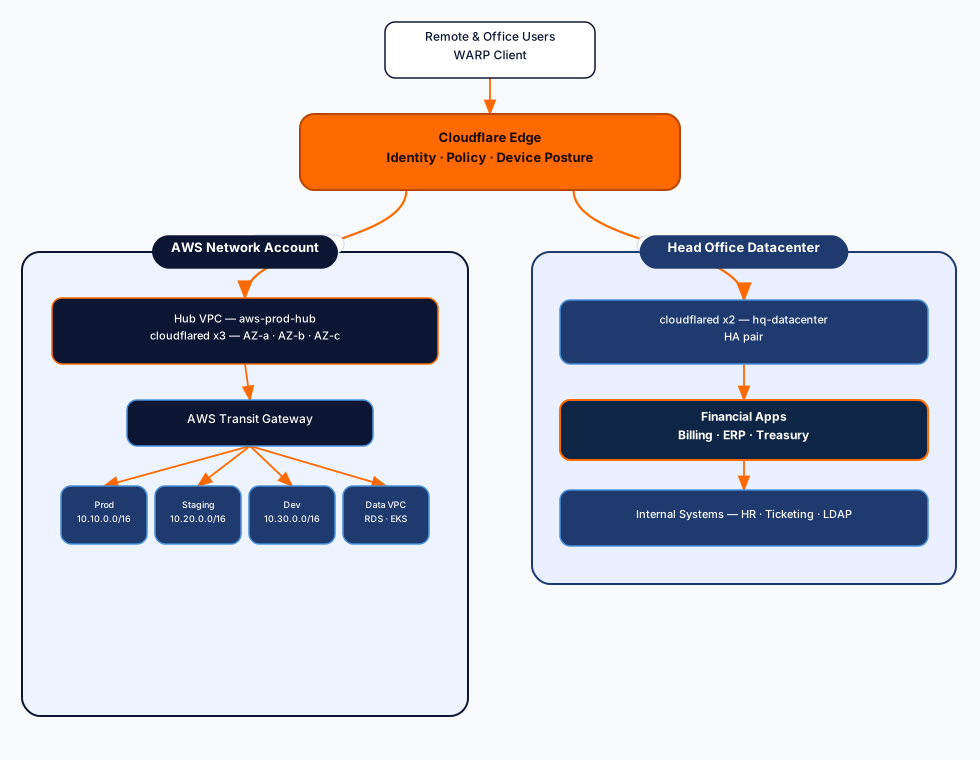
A few things to call out about this design:
- One hub VPC for connectors. All cloudflared replicas live in the same hub VPC. The hub is attached to the Transit Gateway, and the TGW routes traffic to every spoke. This keeps tunnel count low (we run one tunnel with three replicas, not one tunnel per VPC).
- Three cloudflared replicas across three AZs. Each replica is a Fargate task running the same tunnel token. Cloudflare load-balances incoming sessions across them and any one replica can die without anyone noticing.
- No public IPs on the connectors. The Fargate tasks sit in private subnets. The only outbound traffic they need is HTTPS to
region.v2.argotunnel.comon 443 and QUIC on 7844. We route that via a NAT gateway with a tight egress allowlist. - Transit Gateway does the heavy lifting. Our TGW route tables already exist for cross-VPC service traffic; we just added the hub VPC as a new attachment and propagated routes to each spoke. No VPC peering mesh, no extra hops.
The original idea of installing cloudflared inside every VPC also works and is documented across most blog posts. We rejected it because it multiplies tunnel management, secret rotation, and IAM scope by the number of VPCs. With Transit Gateway already in place, one set of replicas in a hub VPC is cleaner.
Head office and on-prem datacenter
Alongside the AWS estate, we extended the same Cloudflare Zero Trust fabric to the head office, which runs an on-prem datacenter hosting mission-critical financial applications - billing, ERP, and treasury tooling that predate cloud by a decade and cannot be migrated on any near-term timeline. These applications needed the same identity-aware access controls as the AWS resources, without punching inbound holes through the datacenter firewall.
The approach mirrors the hub VPC pattern exactly: deploy cloudflared inside the datacenter, register the on-prem CIDRs as routes in Cloudflare Zero Trust, and apply Access policies identical in structure to the AWS ones. From a user’s perspective, reaching billing.internal (on-prem) or metabase.internal (in the data VPC) is the same gesture - WARP is running, Cloudflare authenticates the request against Okta and checks device posture, and traffic goes where policy allows.
A few things are different from the AWS side:
- Separate tunnel from the AWS tunnel. We keep on-prem routes in a second tunnel (
hq-datacenter) entirely separate fromaws-prod-hub. A rotation or an outage on one has no effect on the other. Secret lifecycle and monitoring are scoped per tunnel. - Two cloudflared replicas instead of three. We run two VMs in the datacenter (primary and hot standby) rather than three AZ-spread Fargate tasks. The datacenter does not have three independent failure domains, so a third replica would be false redundancy. Cloudflare load-balances sessions across the two replicas; if one dies the other handles all traffic without intervention.
- Datacenter firewall: two outbound rules only. TCP 443 and UDP 7844 outbound to
region.v2.argotunnel.com. No inbound rules, same as the AWS connectors. The financial applications never hear about any of this - they see normal inbound TCP from the cloudflared process, same as they would from any internal client. - On-prem CIDR registered as a Zero Trust route. We added
10.50.0.0/16(the datacenter network) to Zero Trust Routes pointing athq-datacenter. WARP routes traffic for that range through Cloudflare to the on-prem connector, not toward the VPC. No TGW attachment needed, no Direct Connect required. - Tunnel token stored in HashiCorp Vault. The on-prem connector VMs inject the tunnel token from Vault at systemd service start rather than AWS Secrets Manager. The rotation cadence matches AWS: every 90 days, scripted, with a grace period so both replicas can pick up the new token before the old one expires.
- Financial app policies are the strictest in the estate. The billing and treasury Access applications require geo-restriction to GB and AE, Crowdstrike healthy, MFA assertion fresher than 1 hour, and membership in the
finance-engineeringOkta group. Session duration is capped at 4 hours - the same as the prod database. On-prem financial data does not get relaxed controls because it sits in an office rack rather than a cloud account.
The end result: a finance engineer working from home reaches billing.internal through the same Cloudflare policy enforcement point as prod-postgres.internal. One control plane for both environments, one audit log, one quarterly access review.
Cloudflare Zero Trust Step by Step Setup
Step 1: Create the Cloudflare Zero Trust tunnel
In the Cloudflare dashboard: Zero Trust → Networks → Tunnels → Create a tunnel → Cloudflared. Name it something boring like aws-prod-hub. Cloudflare gives you a tunnel token (a long base64 string). Store it in AWS Secrets Manager immediately. Do not paste it into a Terraform variable file.
aws secretsmanager create-secret \
  --name cloudflared/aws-prod-hub/token \
  --secret-string "eyJhIjoi..." \
  --kms-key-id alias/cloudflared
Step 2: Deploy cloudflared replicas in the hub VPC
We run cloudflared as a Fargate service. The task definition mounts the tunnel token from Secrets Manager and runs the official cloudflare/cloudflared:latest image with the tunnel run --token $TUNNEL_TOKEN command. Desired count: 3, one per AZ, with an awsvpc network mode in three different private subnets.
Security group rules on the task ENI:
- Egress: TCP 443 and UDP 7844 to
0.0.0.0/0(Cloudflare’s edge does not publish a stable IP list small enough to allowlist; use a NAT gateway with VPC endpoints if you want to tighten this further). - Ingress: none. The connector never accepts inbound connections.
You can also run cloudflared on EC2 with systemd if Fargate is not your thing. The official cloudflared AWS deployment guide covers both deployment paths. The principle is the same: pin a version, mount the token from a secret store, run multiple replicas.
Step 3: Register the private CIDR routes
This is the bit most guides gloss over. In Zero Trust → Networks → Routes, add a route for each CIDR you want WARP users to reach. We added routes for two tunnels:
For aws-prod-hub:
10.10.0.0/16(prod VPC)10.20.0.0/16(staging VPC)10.30.0.0/16(dev VPC)10.40.0.0/16(data VPC)
For hq-datacenter:
10.50.0.0/16(head office datacenter)
Cloudflare now knows: traffic destined for any of those CIDRs goes down the appropriate tunnel. WARP users reach AWS resources through one tunnel and on-prem financial applications through the other, with policies applied uniformly at the Cloudflare edge before either path is taken.
Step 4: Make sure Transit Gateway can route the traffic
This is the AWS side of the same picture. The hub VPC needs:
- A TGW attachment in each of the three AZ subnets where cloudflared runs.
- A route in the hub VPC route table sending
10.0.0.0/8to the TGW. - TGW route table entries that propagate each spoke VPC’s CIDR.
- Each spoke VPC needs a return route for the hub VPC CIDR (the cloudflared source IPs) back to the TGW.
If you skip the return route the WARP user’s TCP SYN reaches the database, but the SYN-ACK has nowhere to go. We watched a 90-minute debugging session end in this exact missing route.
Step 5: Configure split tunnel on WARP
WARP defaults to Exclude mode with all RFC1918 ranges excluded, meaning private IPs go to the user’s local network, not through WARP. That is the opposite of what we want. In Zero Trust → Settings → WARP Client → Device Settings → Split Tunnels, we removed all five CIDRs from the exclude list so WARP would handle them - the four AWS VPC ranges plus 10.50.0.0/16 for the on-prem datacenter.
If your office network also uses 10.0.0.0/8 you have a conflict; pick a more specific CIDR (like just 10.10.0.0/16 for prod) instead of removing the whole range. We ran into exactly this for the head office: the office LAN used 10.50.0.0/24, which overlapped with our datacenter allocation. We renumbered the office LAN to 192.168.10.0/24, which resolved it cleanly.
Step 6: Deploy WARP to user devices
For a small team we just have people install the Cloudflare One client and run warp-cli registration team <team-name>. For our larger fleet we ship it via Jamf (macOS) and Intune (Windows) using the protocol handler enrollment flow, so users get auto-registered against Okta on first login.
Device posture rules we require before registration succeeds:
- Disk encryption: on.
- Crowdstrike Falcon: process running.
- OS version: macOS 14+ or Windows 11 22H2+.
- Serial number: present in our corporate device inventory.
How team-based access policies work
Routing the traffic to the VPC is half the job. The other half is making sure the finance team cannot psql into the analytics database. Cloudflare Access does this with policies that match on identity, group, device, location, and time. Each policy attaches to a target (a hostname, a Private Network IP, a SaaS app).
We organise policies around Access Applications. An application is a thing a user wants to reach: a private hostname like metabase.internal, or a TCP target like prod-postgres.internal:5432. Each application gets one or more policies.
A concrete example. The finance team has its own database, finance-db.internal (resolving to 10.40.5.12 inside the data VPC). The Access application:
- Type: Private Network
- Target:
10.40.5.12/32on TCP 5432 - Session duration: 8 hours
The policies on that application:
ALLOW: identity.groups in ["finance-engineering"]
       AND device_posture.crowdstrike == "healthy"
       AND geo.country in ["GB", "AE"]

BLOCK: everyone else
For an internal web app like Grafana the policy looks similar but matches a hostname. We publish grafana.internal.tasrie.com as an Access application, route it through the tunnel to the internal load balancer, and attach a policy that allows the sre and platform Okta groups with MFA enforced.
Some patterns worth stealing:
- One Access group per team, not per resource. We have
finance-engineering,sre,platform,data-platform,app-engineering. Resources reference these groups. When a person joins finance, IT adds them to one Okta group and they get all the right access. - Block-by-default at the bottom. Every application ends with an explicit
Block everyonerule. If no allow matches, the request is denied. Default-deny beats default-allow every time. - Short session durations for high-value targets. Production database sessions: 4 hours. Internal admin UIs: 8 hours. Read-only dashboards: 24 hours. Forces re-auth often enough to neutralise stolen sessions but not so often that engineers hate the tool.
The detail Cloudflare’s docs underspecify: the order policies are evaluated. Within one application, rules are evaluated top-down and the first match wins. So put your most specific allows above broader denies. We learned this when a “block contractors” policy was masking an “allow specific contractor X” policy that needed to be above it.
Cloudflare Zero Trust SSH access
SSH is one of the first things people want to move off bastions and it is where this setup earns its keep fastest. There are three modes, and we use all three depending on who needs access.
WARP-based SSH (engineers on managed laptops): With WARP running and the EC2 or on-prem server CIDR routed through the Cloudflare Zero Trust tunnel, SSH just works. The engineer runs ssh user@10.10.5.23 the same as on a local network. Cloudflare evaluates the Access policy at the tunnel entry point before the TCP connection reaches the server. No changes to sshd_config, no jump hosts, no key distribution headaches.
We lock SSH down to specific groups - only it-admins and devops can reach port 22 on production hosts. Everyone else gets denied at the Cloudflare layer before a packet ever reaches the server:
# Access Application: prod-ssh (Private Network, TCP 22, 10.10.0.0/16)

ALLOW: identity.groups in ["it-admins", "devops"]
       AND device_posture.crowdstrike == "healthy"
       AND device_posture.disk_encryption == true
       AND geo.country in ["GB", "AE"]

BLOCK: everyone else
App engineering, data, and finance groups hit this deny rule even if they know the private IP. The it-admins group is kept deliberately small - four people - and reviewed quarterly. Adding someone to the devops Okta group is the only provisioning step needed; the SSH policy picks it up instantly.
Clientless browser SSH (contractors and break-glass): Cloudflare Access renders a full SSH terminal in the browser. Publish bastion.internal.tasrie.com as an Access application with protocol SSH, and any user who passes the Okta + device posture check gets an in-browser terminal session. No WARP client required. We use this for contractors who cannot install WARP on their machines, and for emergency access where we want a complete audit trail without trusting that WARP is installed and current.
Short-lived SSH certificates (what we rolled to production): Cloudflare can issue short-lived certificates signed by a CA it manages, with a TTL of 10 minutes. The EC2 instance trusts that CA via TrustedUserCAKeys. Engineers never distribute public keys manually, key rotation is automatic, and a stolen cert is useless after 10 minutes. The setup is a one-time sshd_config change on each host plus adding the Cloudflare SSH CA public key to /etc/ssh/ca.pub. After that:
# One-time alias (add to ~/.ssh/config)
Host *.internal.tasrie.com
  ProxyCommand cloudflared access ssh --hostname %h
  User ec2-user
Then ssh prod-app-01.internal.tasrie.com works - Cloudflare Zero Trust handles the certificate issuance, the policy check, and the tunnel, all invisibly.
The bastion host we decommissioned had 14 static key pairs that nobody had audited in two years. The short-lived certificate approach replaced all 14 with zero manually managed keys.
Production hardening checklist
The list we run through before any new tunnel goes live:
- Tunnel token rotation. Every 90 days. We rotate via Terraform, push the new token to Secrets Manager, and force a Fargate task redeploy. Cloudflare lets the old token keep working for a grace period so there is no downtime.
- VPC Flow Logs everywhere. Both the hub and every spoke. We pipe them to S3 then to Athena. When someone asks “did Alice ever reach the finance DB”, we can answer in 30 seconds.
- Logpush to SIEM. Cloudflare Access audit logs go to our SIEM via Logpush. Every allow and deny is searchable for at least 1 year for compliance.
- MFA on production policies. Any Access application that touches a production resource requires MFA at login time, even if the user already MFA’d into Okta. Cloudflare validates the MFA assertion freshness.
- TLS decryption inside the tunnel where lawful. For traffic to internal HTTPS apps we terminate TLS at the cloudflared connector, apply Gateway HTTP policies (file type blocks, DLP), then re-encrypt to the origin. Office workers’ personal traffic is never decrypted (split tunnel excludes it).
- Quarterly access review. Export the list of Access applications and the Okta groups attached to each. The owning team has to re-attest that the access list is still correct. Anything not re-attested in 14 days gets converted to break-glass-only.
- Connector version pinning + auto-update window. We pin
cloudflaredto a specific image SHA, but we update monthly during a maintenance window. Letting:latestauto-pull is how you get bitten at 3am.
For broader cloud security posture beyond just access, our cloud native security practices for 2026 write-up covers the rest of the stack (workload identity, secrets, runtime protection).
Gotchas we hit (so you do not have to)
A handful of things that cost us hours:
*.amazonaws.comand Cloudflare Gateway DNS. Do not route*.amazonaws.comthrough your custom Cloudflare Gateway resolver policy or Local Domain Fallback unless you understand how it interacts with VPC DNS. We broke the AWS Console for a day because Gateway started resolvingsignin.aws.amazon.comdifferently than the user’s browser expected.- Overlapping CIDRs between office and VPC. One of our offices ran
10.10.0.0/16internally, same as our prod VPC. Cue chaos. Either renumber the office (we did) or use a Cloudflare virtual network to disambiguate. - MTU and QUIC. A couple of corporate firewalls on customer sites silently dropped UDP 7844. WARP fell back to TCP and everything kept working, but performance was worse than it should have been. The fix was a firewall rule on their side. The signal:
warp-cli debug-statsshows protocol = TCP instead of MASQUE. - EKS pod-level routing. WARP users hit cluster IPs (
10.xoverlay) but not pod IPs directly unless you also route the pod CIDR. Most teams want service IPs only; if you actually need pod-level access (rare), add that CIDR explicitly. - NAT gateway costs. Three cloudflared replicas in three AZs each generate steady outbound to Cloudflare. NAT gateway data processing charges added up. We moved the connectors to an AZ-local NAT pattern (NAT per AZ) so traffic does not cross AZs to egress, which cut the bill.
- Browser-based access vs WARP-based access. Cloudflare Access supports both: clientless reverse proxy for web apps, WARP for TCP/UDP/everything else. We default to clientless for internal websites because there is no client to install. Use WARP when you need Cloudflare Zero Trust SSH, database protocols, or anything non-HTTPS.
When does this approach not fit?
A few cases where Cloudflare Zero Trust + WARP is the wrong choice:
- Hard data residency requirements that forbid third-party transit. If your regulator says no traffic may leave your AWS region, even encrypted, you need a self-hosted alternative (Tailscale on your own coordination server, or AWS Verified Access).
- Heavy non-IP traffic. WARP handles IP traffic well; if you need to bridge multicast, IPX, or other Layer 2 protocols you are in the wrong tool category.
- Tiny teams without an IdP. Cloudflare Zero Trust is dramatically better when you have a real identity provider. With a 5-person startup using Google Workspace as both email and IdP, it still works, but the operational ROI is smaller than the licence.
For most teams above ~20 people using AWS, an IdP, and at least one VPN nobody enjoys maintaining, this is the cheapest meaningful security upgrade you can ship in a quarter.
Move off your office VPN and onto Cloudflare Zero Trust
Replacing a site-to-site VPN with Cloudflare Zero Trust is a 4-6 week project for a typical AWS estate, not a multi-quarter migration. Most of the time goes into deciding the access policies (who reaches what) rather than the networking, which is the Cloudflare Tunnel install plus a few Transit Gateway routes.
Tasrie IT Services provides comprehensive Cloudflare managed services to help you:
- Design the hub-and-spoke architecture with Transit Gateway, cloudflared replicas, and split-tunnel CIDR plans that do not collide with your office networks.
- Map your existing VPN access to per-team Access policies using your Okta, Azure AD, or Google Workspace groups, with device posture and MFA enforced.
- Cut over without downtime by running WARP and the legacy VPN in parallel, migrating teams in waves, then decommissioning the VPN endpoint and the bastion fleet.
We run Cloudflare Zero Trust in production for clients across regulated industries (healthcare, finance, fintech) and pair it with Cloudflare WAF and rate limiting for the public-facing side of the stack. The end state is a single identity-driven control plane for both internal and external access.
Talk to our team about a Cloudflare Zero Trust deployment for your AWS estate →