 ChatGPT
 Perplexity
 Claude
Elite delivery on AWS is not about “having a CI/CD tool”. It is about designing a repeatable, governed, and observable delivery system that turns every code change into a low-risk, auditable production release.
This blueprint breaks down what an “AWS DevOps pipeline” looks like in high-performing teams, how to structure environments and quality gates, and which AWS building blocks fit each stage.
What makes an AWS DevOps pipeline “elite” (and not just automated)
Most pipelines can build and deploy. Elite pipelines do three additional things consistently:
- Reduce uncertainty: every change is tested, scanned, and promoted with the same rules.
- Reduce blast radius: deployments are progressive (canary/blue-green), with fast rollback.
- Prove outcomes: you can measure lead time, change failure rate, MTTR, and availability, not just “pipeline success”.
If you want an objective yardstick, the industry standard is the DORA metrics. The DORA research is a useful reference when aligning engineering goals with measurable delivery performance.
The reference architecture: how the pipeline fits into AWS
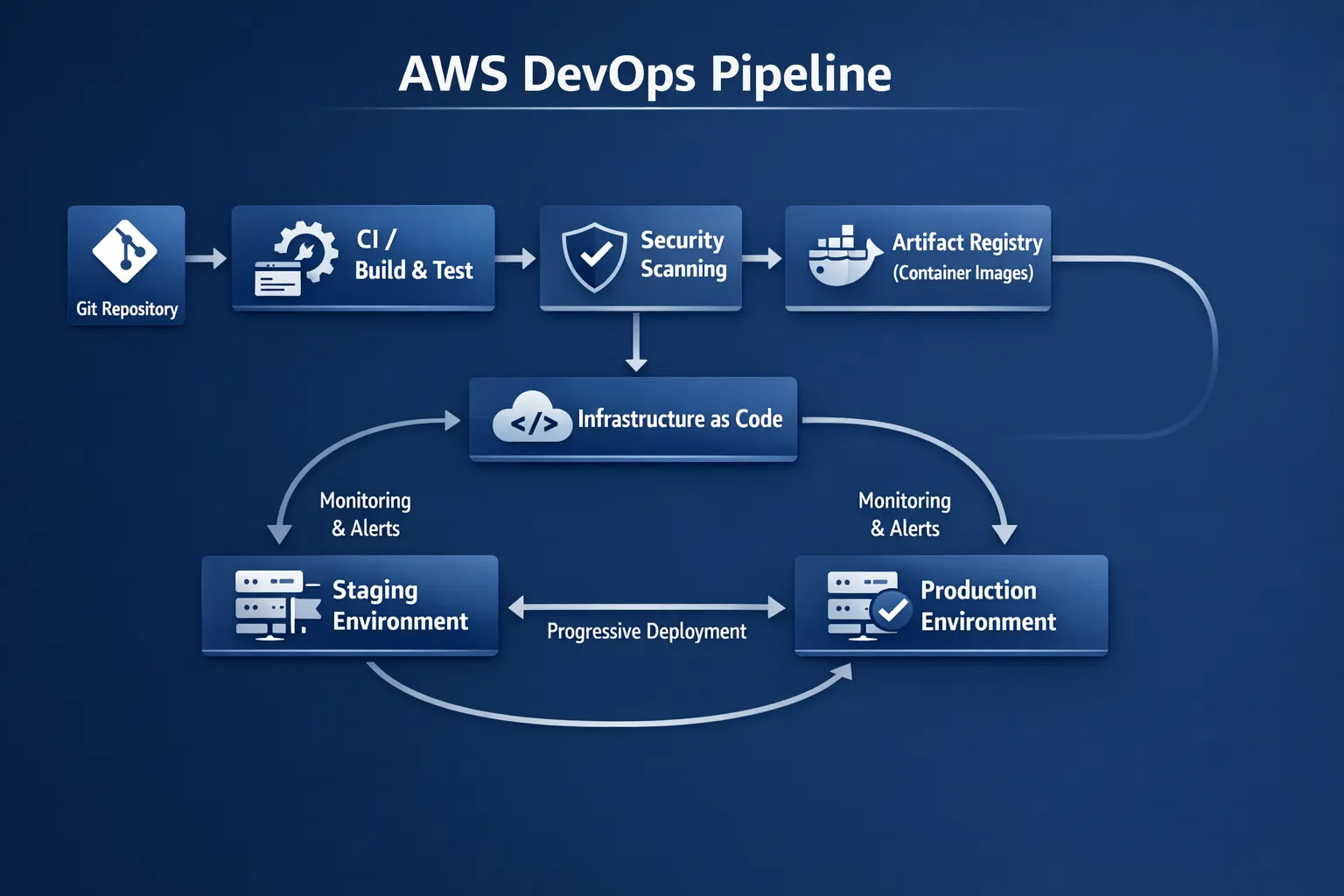
A common failure mode is treating the pipeline as a single line from “Git to Prod”. In practice, an AWS DevOps pipeline is a system spanning source control, build, security, infrastructure, release orchestration, and runtime observability.
At a high level, a production-grade setup tends to separate concerns like this:
- Source of truth: Git for application code and IaC, plus a clear branching and release strategy.
- Build and test: deterministic builds, cached dependencies, repeatable unit/integration tests.
- Artifact integrity: immutable artifacts (container images, packages) stored in a registry.
- Environment promotion: dev, staging, production (and sometimes pre-prod), with policy gates.
- Release strategies: canary, blue-green, feature flags.
- Runtime verification: health checks, SLO-based alerting, automated rollback triggers.
A practical service map (AWS-native)
Depending on your stack (VMs, containers, serverless), the services change. These are common AWS-native components:
- Orchestration: AWS CodePipeline (or a third-party orchestrator if standardised).
- Build: AWS CodeBuild.
- Deploy: AWS CodeDeploy (EC2/ECS/Lambda), or GitOps tools for Kubernetes.
- Artifacts: Amazon ECR for container images, plus S3 for packaged artifacts.
- IaC: AWS CloudFormation or Terraform.
- Secrets: AWS Secrets Manager or SSM Parameter Store.
- Security signals: AWS Security Hub (aggregation), plus service-specific scanners.
- Observability: CloudWatch (baseline), plus OpenTelemetry-based pipelines where needed.
This blueprint is tool-agnostic on purpose, but it is mapped to AWS building blocks so teams can implement without “platform sprawl”.
Pipeline stages and quality gates (a blueprint you can operationalise)
The easiest way to design for speed and safety is to treat each stage as producing evidence: test results, scan results, approvals, and deployment verification.
Here is a blueprint you can adapt.
| Stage | Goal | Typical AWS components | Non-negotiable quality gate (examples) |
|---|---|---|---|
| Source | Traceable change control | CodeCommit/GitHub/GitLab + PRs | Required reviews, branch protection, signed commits where applicable |
| Build | Deterministic artefact creation | CodeBuild | Build reproducibility, dependency pinning, SBOM generation (where required) |
| Test | Fast feedback, prevent regressions | CodeBuild + test frameworks | Unit tests required, integration tests for critical paths |
| Security | Shift-left risk reduction | Security scanners + Security Hub aggregation | No critical vulnerabilities (or documented exceptions), secrets detection |
| Package | Immutable artefact storage | ECR, S3 | Image tagging strategy, provenance, immutable versioning |
| IaC plan/apply | Repeatable infrastructure change | CloudFormation/Terraform | Policy-as-code checks, drift detection, least privilege |
| Deploy | Safe rollout | CodeDeploy/ECS/EKS + progressive delivery | Canary/blue-green strategy for critical services |
| Verify | Production confidence | CloudWatch, synthetic checks, tracing | SLO-based checks, rollback on error budget burn |
| Observe | Close the loop | Metrics/logs/traces, alerting | Actionable alerts (not noise), incident runbooks |
The “elite” difference is not any single gate, it is that gates are codified, consistent, and tied to business risk.
Environment strategy: the part most pipelines get wrong
Teams often build “dev, staging, prod” but forget the hard parts:
- Are environments truly identical? If staging does not match production topology, you are testing the wrong system.
- Is promotion artefact-based? Elite teams promote the same artefact through environments (same image digest), they do not rebuild per environment.
- Is configuration externalised? Environment differences should be configuration, not code branches.
Recommended baseline: multi-account, policy-driven
For many organisations, especially regulated ones, a multi-account approach simplifies governance (separation of duties, blast radius control). Tie it back to a landing zone and standardise:
- Networking patterns and egress controls
- IAM boundaries and role assumptions
- Centralised logging and security aggregation
- Guardrails for provisioning
If you need a formal reference, the AWS Well-Architected Framework provides a helpful lens for reliability, security, performance efficiency, cost optimisation, and operational excellence.
Release strategies that keep speed high and risk low
If your deployment method is “replace everything and hope”, you will eventually slow down. High-performing AWS DevOps teams standardise progressive delivery patterns:
Blue-green deployments (great default for services)
Blue-green gives you a clean rollback path and predictable cutovers.
Where it fits well:
- ECS services behind load balancers
- EC2 deployments managed via CodeDeploy
- Critical APIs where rollback must be quick
Canary releases (best for high-traffic, high-change systems)
Canary releases reduce blast radius by slowly increasing traffic to the new version while watching SLIs.
Key design requirements:
- Strong telemetry (latency, error rate, saturation)
- Automated rollback criteria
- Versioned database migration strategy (forward- and backward-compatible changes)
Feature flags (the hidden accelerator)
Feature flags decouple deployment from release. That means you can deploy safely during business hours but enable functionality when the business is ready.
The operational rule is simple: flags must have owners and expiry, otherwise they become permanent complexity.
DevSecOps on AWS: make security a pipeline property
Security is not a “phase at the end”. In elite pipelines, security is engineered into workflows so it does not become a release blocker.
A practical DevSecOps baseline includes:
- Identity-first access: short-lived credentials, least privilege, MFA for humans.
- Secrets hygiene: no secrets in Git, automated rotation where feasible.
- Supply chain controls: trusted base images, vulnerability scanning, signed artefacts where required.
- Policy as code: guardrails for infrastructure, networking, and data access.
If you operate in regulated environments, it also helps to formalise what “evidence” looks like (audit logs, change approvals, scan results). That is exactly why many teams start with a structured assessment such as a DevOps Strategy & Assessment before scaling automation.
Observability: the feedback loop that makes CI/CD safe
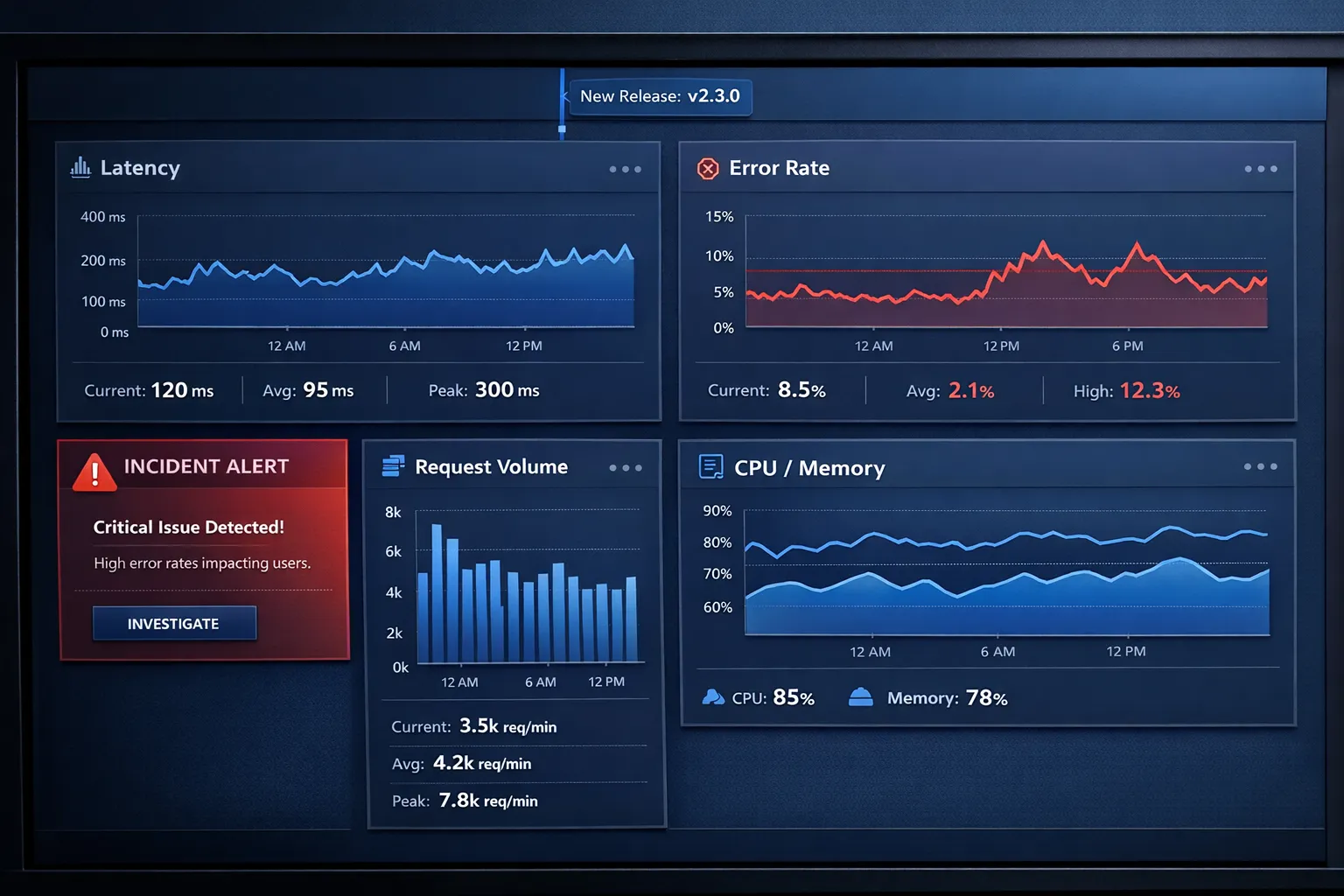
CI/CD without runtime visibility is just fast failure. Your pipeline should “listen” to production through:
- Golden signals: latency, traffic, errors, saturation
- User-impact metrics: availability for key journeys, not just service uptime
- Tracing for change verification: canary errors are easiest to see with trace-level context
A practical way to standardise this is OpenTelemetry, which helps teams avoid per-language monitoring fragmentation. If you are building a modern telemetry pipeline, our observability consulting team and Tasrie’s guide on OpenTelemetry for cloud observability are strong starting points.
Cost and sustainability: the often-missed dimension of pipeline design
Elite delivery is also efficient delivery. Poor pipeline design can inflate cost through:
- Over-provisioned build agents
- Excessive test environments that never shut down
- High-cardinality telemetry that becomes a surprise bill
- Always-on staging stacks that mirror production unnecessarily
A pragmatic approach is to treat CI/CD capacity and environment lifecycles as part of FinOps. In some industries, this links to broader operational cost drivers like energy procurement and energy management. For organisations that want to understand how commercial energy users approach cost control and planning, resources like the BVGE (Bundesverband der gewerblichen Energienutzer) provide useful context.
For AWS-specific tactics, you can align pipeline improvements with cost visibility and governance patterns from an AWS cloud cost optimisation programme.
A 90-day implementation plan (what to do first, second, third)
This is where many teams over-invest in tools too early. A better sequence is to establish flow, then add sophistication.
Days 0 to 30: stabilise and standardise
Focus on repeatability:
- Standard CI template (build, unit tests, linting)
- One artefact format per workload type (container image for services is a common default)
- Basic security checks (secrets detection, dependency scanning) wired into PRs
- Minimum observability baseline and deployment markers
Days 31 to 60: scale quality gates and environment promotion
Focus on safe speed:
- Promotion model (same artefact promoted through environments)
- IaC patterns for environment creation and teardown
- Progressive delivery for at least one critical service
- Policy-as-code guardrails for infrastructure changes
Days 61 to 90: reliability, auditability, and measurable outcomes
Focus on “elite” characteristics:
- SLOs defined for critical services, with alerting tied to error budgets
- Automated rollback triggers for canaries
- Change failure analysis (post-incident learnings feeding back into tests and gates)
- A dashboard for DORA metrics and operational KPIs
If you run Kubernetes on AWS, make sure your cluster architecture and node strategy can support progressive delivery and autoscaling under deployment load. A good reference is Tasrie’s practitioner guide on EKS architecture best practices.
Common anti-patterns to avoid
Even strong teams fall into these traps:
- Rebuilding per environment: breaks traceability and increases drift.
- Manual, undocumented approvals: slows delivery without improving safety.
- CI that “passes” but produces flaky releases: usually a sign of weak integration tests and missing production verification.
- Pipeline-as-a-snowflake: each repo has a bespoke pipeline, nobody can maintain it.
- Observability afterthought: no release markers, no SLOs, noisy alerts.
When you see these patterns, the fix is rarely “add another tool”. It is almost always a platform and operating-model problem, which is why many organisations adopt a structured approach to cloud operations management with runbooks, SLOs, and automation.
Frequently Asked Questions
What is an AWS DevOps pipeline? An AWS DevOps pipeline is a set of automated and governed stages that take code from source control through build, testing, security checks, packaging, infrastructure changes, deployment, and production verification, using AWS services and best practices.
Which AWS services are commonly used for CI/CD? Many teams use AWS CodePipeline for orchestration, CodeBuild for builds/tests, CodeDeploy for deployments, ECR for container images, and CloudFormation or Terraform for Infrastructure as Code. The exact mix depends on whether you deploy to EC2, ECS, EKS, or serverless.
How do I make my pipeline secure without slowing down releases? Treat security as a pipeline property: automate scanning and policy checks early (pull requests), standardise trusted base images and artefact handling, centralise security findings, and define clear exception workflows. The goal is predictable gates, not last-minute blockers.
What’s the difference between CI/CD and elite delivery? CI/CD is automation. Elite delivery is automation plus progressive release strategies, strong observability, low change failure rate, fast recovery, and measurable outcomes (often tracked with DORA metrics and SLOs).
Do we need Kubernetes (EKS) to have a world-class AWS DevOps pipeline? No. Elite pipelines exist for EC2, ECS, Lambda, and hybrid environments. Kubernetes can improve standardisation and portability, but it also adds operational complexity, so it should be a deliberate choice.
Build your AWS DevOps pipeline with measurable outcomes
If you want this blueprint turned into an operating delivery system, Tasrie IT Services can help you design and implement an AWS DevOps pipeline that fits your architecture, compliance constraints, and delivery goals.
Tasrie’s work typically includes aligning pipeline design to outcomes (lead time, reliability, cost), implementing Infrastructure as Code and CI/CD automation, embedding DevSecOps controls, and setting up the observability and runbooks needed to operate safely at speed.
Learn more about Tasrie IT Services at tasrieit.com, or explore their engineering approach to Cloud DevOps services to see what a structured engagement can look like.