 ChatGPT
 Perplexity
 Claude
Cloud migrations only become “success stories” in hindsight. In the moment, they are usually a sequence of awkward constraints, legacy surprises, stakeholder anxiety, and fast decisions made with incomplete information.
What separates a migration that quietly unlocks faster delivery and lower costs from one that becomes a multi-quarter firefight is rarely a single tool or cloud provider. It is a set of repeatable execution patterns: clear outcomes, disciplined foundations, automation, security and reliability built in from day one, and a realistic operating model.
Below are real-world cloud migration success stories (drawn from common patterns we see across AWS, Azure, Kubernetes and data platforms) and the lessons that teams consistently report “from the trenches”.
The “shape” of a cloud migration success story
When you read cloud migration case studies, the headline results often look similar: lower costs, better uptime, faster deployments. The interesting part is how teams got there.
Across successful migrations, you will usually find:
- A clear definition of what “better” means (cost, time-to-market, resilience, compliance, developer productivity)
- A migration strategy that matches the workload (rehost, replatform, refactor, retire, retain)
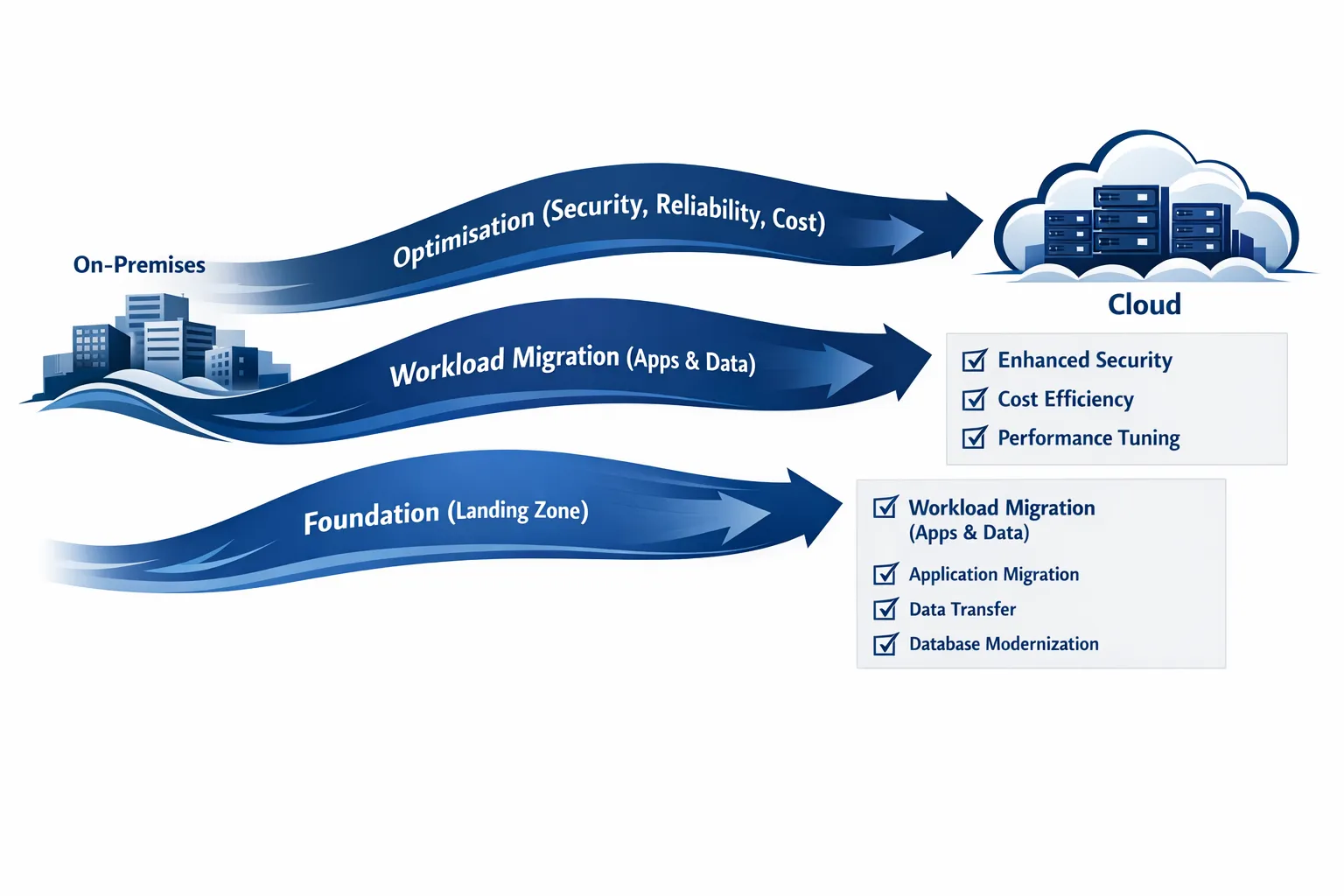
- Strong cloud foundations (identity, networking, governance, security, observability)
- Automation as the default (Infrastructure as Code, CI/CD, policy as code)
- A deliberate handover into operations (SLOs, runbooks, on-call readiness, cost ownership)
If your programme is missing two or three of these, it is still possible to “move workloads”, but it is much harder to call it a success.
Five cloud migration success stories (and what made them work)
Rather than retelling one long case study, here are short success-story snapshots that highlight different migration goals.
1) From on-prem constraints to compliant, resilient healthcare workloads
In regulated environments (healthcare, finance, public sector), migrations succeed when the programme treats compliance and resilience as first-class deliverables, not a final checklist.
A typical winning approach looks like:
- Building a secure landing zone first (accounts, networking, logging, guardrails)
- Defining RTO/RPO and testing disaster recovery early
- Implementing continuous monitoring plus alerting and audit evidence generation
The end result is not just “running in AWS” or “running in Azure”. It is an operationally credible platform that can pass audits, recover from incidents, and scale when demand spikes.
You can see an example of this pattern in Tasrie IT’s healthcare cloud migration story, where the focus included OpEx transition, multi-region DR and security controls: Cloud Migration for Enhanced Financial Efficiency and Cybersecurity in Healthcare.
2) Azure migration that reduces operational drag through device and identity consolidation
For many mid-sized organisations, the first migration win is not containers. It is reducing day-to-day friction:
- Centralised device management
- Consistent identity policies
- Repeatable server migration steps
In practice, teams succeed when they treat “device + identity + workload” as one system and plan the cutover phases accordingly. A good example is a migration that paired server moves to Azure with Microsoft InTune rollout, simplifying ongoing operations and strengthening security posture: Enhancing Cloud Capabilities for Social Media Platform Through Azure Migration.
3) Containerising a legacy application to unlock safer deployments
Legacy modernisation succeeds when teams avoid boiling the ocean.
A common successful pattern is:
- Containerise the application as-is (minimise code changes)
- Put a production-grade deployment pipeline around it
- Add monitoring, rollback paths, and scaling controls
This creates a stable “platform layer” first. Only then does it make sense to refactor architecture or split services.
A representative example is a legacy order system modernised via Docker, Kubernetes, CI/CD and Prometheus/Grafana for observability: Dockerizing and Migrating Legacy Order System to Cloud.
4) Post-migration success: cutting cloud spend without breaking reliability
A migration is not truly successful if costs balloon after go-live. In fact, many organisations only get cost visibility once they are in cloud, then discover over-provisioning, idle environments, and inefficient node usage.
When cost optimisation is done well, it is paired with reliability engineering (so savings do not increase incident rates). One practical pattern is a hybrid strategy using spot instances with disruption-aware design (Pod Disruption Budgets, spreading, and alerting): 30% Cost Reduction in AWS EKS Monthly Bill Through Spot Instance Optimization.
5) Data migration that delivers new capabilities, not just a new hosting location
Data platform migrations work best when they target a measurable capability upgrade, such as:
- Moving from batch to near real-time processing
- Improving incident detection and operational analytics
- Enabling scalable, automated workflows
This is where cloud can shift the business from “reporting what happened” to “responding as it happens”. A good example is a pipeline modernisation with CDC, orchestration, and scalable processing: Data Pipeline Revolution for Environmental Services with Real-Time Processing.
Lessons from the trenches (what teams wish they had done earlier)
The stories above look different on the surface, but the underlying lessons repeat.
Lesson 1: Start with outcomes, constraints, and “non-negotiables”
Cloud migration programmes derail when “move to cloud” is the goal.
Instead, define:
- Business outcomes (release speed, cost reduction, scalability, regional expansion)
- Constraints (data residency, compliance frameworks, vendor restrictions)
- Non-negotiables (RTO/RPO targets, encryption requirements, audit logging)
This decision set should drive architecture and migration sequencing.
If you need a structured way to do this, cloud providers publish widely used frameworks like the AWS Cloud Adoption Framework and the Microsoft Cloud Adoption Framework. You do not have to follow them perfectly, but borrowing their language helps align teams.
Lesson 2: Build the landing zone before the first workload
A “fast” migration that skips foundations often becomes a slow remediation project later.
A practical landing zone baseline usually includes:
- Identity and access management with least privilege
- Network design that supports segmentation and private connectivity
- Centralised logs, metrics, traces, and security telemetry
- Account/subscription structure, tagging, and cost allocation
- Backup and DR primitives that teams can reuse
The measurable benefit is not just security. It is speed, because each application team is no longer re-inventing the basics.
Lesson 3: Treat the migration as a software delivery problem
Successful teams apply DevOps discipline to infrastructure changes.
That typically means:
- Infrastructure as Code (repeatable environments, peer review, drift control)
- CI/CD for application and infrastructure changes
- GitOps for Kubernetes where it makes sense
- Automated testing for performance and reliability (at least smoke and regression tests)
The key insight: your migration plan is only as reliable as your ability to deploy changes safely and repeatedly.
Lesson 4: Observability is not “nice to have”, it is how you survive cutover
Most migration risk concentrates around cutover windows: changed dependencies, new network paths, different scaling behaviour, new failure modes.
Teams that succeed instrument early and define what “healthy” looks like before moving traffic.
That includes:
- Service Level Indicators (SLIs) aligned to user experience (latency, error rate, availability)
- Alerts that page humans only for actionable issues
- Dashboards used during migration rehearsals
- Runbooks that reflect the new architecture, not the old one
If you want a deeper view on building multi-layer monitoring in real environments, Tasrie IT has a practical breakdown here: Ensuring Peak Performance with Multi-Level Monitoring.
Lesson 5: Security works best as an accelerator, not a blocker
The most effective security posture in migration programmes is “guardrails plus automation”.
Examples include:
- Policy as code for baseline controls (identity, network rules, encryption)
- Standardised secrets management patterns
- Container and dependency scanning integrated into CI/CD
- Audit evidence that is produced continuously, not manually assembled
This approach reduces late-stage rework and helps teams move faster with fewer exceptions.
Lesson 6: FinOps is not a phase, it is a habit
Cloud spending problems rarely come from a single expensive service. They come from hundreds of small decisions:
- Oversized instances
- Idle non-production environments
- Storage sprawl
- High-cardinality telemetry without retention controls
Teams that deliver sustained savings establish cost ownership and simple mechanisms early: tagging, budgets, unit-cost metrics, and regular optimisation sprints.
Lesson 7: The operating model is part of the migration scope
A migration that “finishes” but leaves teams unable to operate the platform is not a success.
Plan for:
- Ownership boundaries (product teams vs platform teams)
- On-call responsibilities and escalation paths
- Skills uplift and documentation
- A realistic support model (including after-hours coverage if needed)
This is also why many organisations choose a hybrid delivery model: internal engineers keep ownership while senior specialists accelerate foundations and de-risk key decisions.
A quick field guide: success patterns vs failure signals
The table below summarises what tends to separate successful cloud migration programmes from painful ones.
| Area | What success looks like | Early warning sign | Practical fix |
|---|---|---|---|
| Strategy | Clear outcomes, workload-by-workload approach | “We are moving everything by Q3” with no sequencing | Define migration waves and success metrics per wave |
| Foundations | Landing zone, guardrails, central logging | Teams creating ad-hoc networks/IAM per app | Establish reusable templates and platform standards |
| Automation | IaC and CI/CD are default | Manual console changes and undocumented runbooks | Introduce IaC, code review, and drift detection |
| Data | Explicit RTO/RPO, tested backups and restore | Backups exist but restores are untested | Run restore drills and automate validation |
| Security | Built-in controls, policy as code | Security review happens only at the end | Shift-left security with pipelines and templates |
| Cutover | Rehearsals, monitoring, rollback plans | “Big bang” cutover with no rollback | Use blue-green/canary where feasible, rehearse |
| Cost | Allocation, budgets, unit economics | Surprise bills, unclear ownership | Tagging standards, budgets, regular optimisation |
What to measure so your migration success is provable
Executives and engineering teams often disagree on what “success” is unless it is measured.
A practical scorecard blends delivery speed, reliability, cost, and security.
| Metric category | Example metric | Why it matters |
|---|---|---|
| Delivery | Deployment frequency, lead time for changes | Shows whether the platform is improving shipping speed |
| Reliability | SLO compliance, MTTR, incident rate | Proves the migration did not trade speed for outages |
| Performance | p95 latency, error rate under load | Validates user experience and capacity planning |
| Cost | Cost per environment, cost per transaction/user | Connects cloud spend to business value |
| Security | Vulnerability remediation time, audit findings | Keeps the programme credible in regulated settings |
If you already track DORA-style delivery metrics and SLOs, you have a strong foundation for “before vs after” comparisons.
A note on “unexpected” workloads: marketing and growth stacks
Cloud migrations tend to focus on core systems: applications, data platforms, identity, network, and security. But modern businesses also run critical growth tooling that may rely on regional behaviour, latency, or local platform dynamics.
If your migration programme includes global expansion, it can be useful to review how non-engineering teams publish and distribute content in different countries, and whether your cloud architecture supports that operating model (for example via centralised asset delivery, automation, and clear access controls). Tools like TokPortal are an example of a service businesses use to reach real local audiences by posting TikToks organically in target countries, and they often surface practical questions about account ownership, security, and workflow automation that your platform should handle cleanly.

Frequently Asked Questions
What is the biggest reason cloud migrations fail? The most common root cause is unclear goals, followed closely by skipping foundations (identity, networking, governance, observability). When success is not defined, teams optimise for “moving” rather than improving outcomes.
How do I choose between lift-and-shift and refactoring? Use a workload-by-workload decision. Rehost (lift-and-shift) can be sensible to exit a data centre quickly, but refactor is usually justified when you need major improvements in scalability, reliability, or delivery speed.
Do we need Kubernetes to have a successful cloud migration? No. Many successful migrations start with managed services, VMs, and standard CI/CD, then adopt Kubernetes where it fits the operating model and workload needs.
When should we bring in external cloud migration consultants? Typically when you need to accelerate foundations, de-risk architecture and security decisions, or recover a migration that has stalled. A hybrid model often works well: internal teams keep ownership while senior specialists speed up delivery.
How long does a cloud migration usually take? It depends on scope, risk tolerance, and how many workloads can be migrated in parallel. Many organisations see meaningful results within the first 60 to 90 days if the programme starts with a clear landing zone and a thin-slice migration.
How do we prove ROI after the migration? Establish a baseline before moving (cost, uptime, delivery metrics), then measure the same scorecard after each migration wave. Include unit-cost metrics so savings are tied to business activity, not just a lower monthly bill.
Ready to turn your migration into a success story?
Tasrie IT Services helps teams migrate and modernise with an outcomes-first approach across DevOps, cloud native platforms, CI/CD automation, Infrastructure as Code, security, and observability.
If you want a clear migration plan, a secure landing zone, and a delivery approach that reduces risk while improving speed, start with a conversation at Tasrie IT Services.