If your AWS bill keeps creeping up despite engineering efforts to be efficient, you are not alone. Cloud spend is a product decision, an engineering decision, and a finance decision. The most successful teams treat cost as a first class metric, the same way they treat latency and reliability. This practical guide distils what works in 2025 for UK organisations running on AWS, from quick wins to structural changes that deliver durable savings without sacrificing performance or security.
A simple framework for AWS cost optimisation
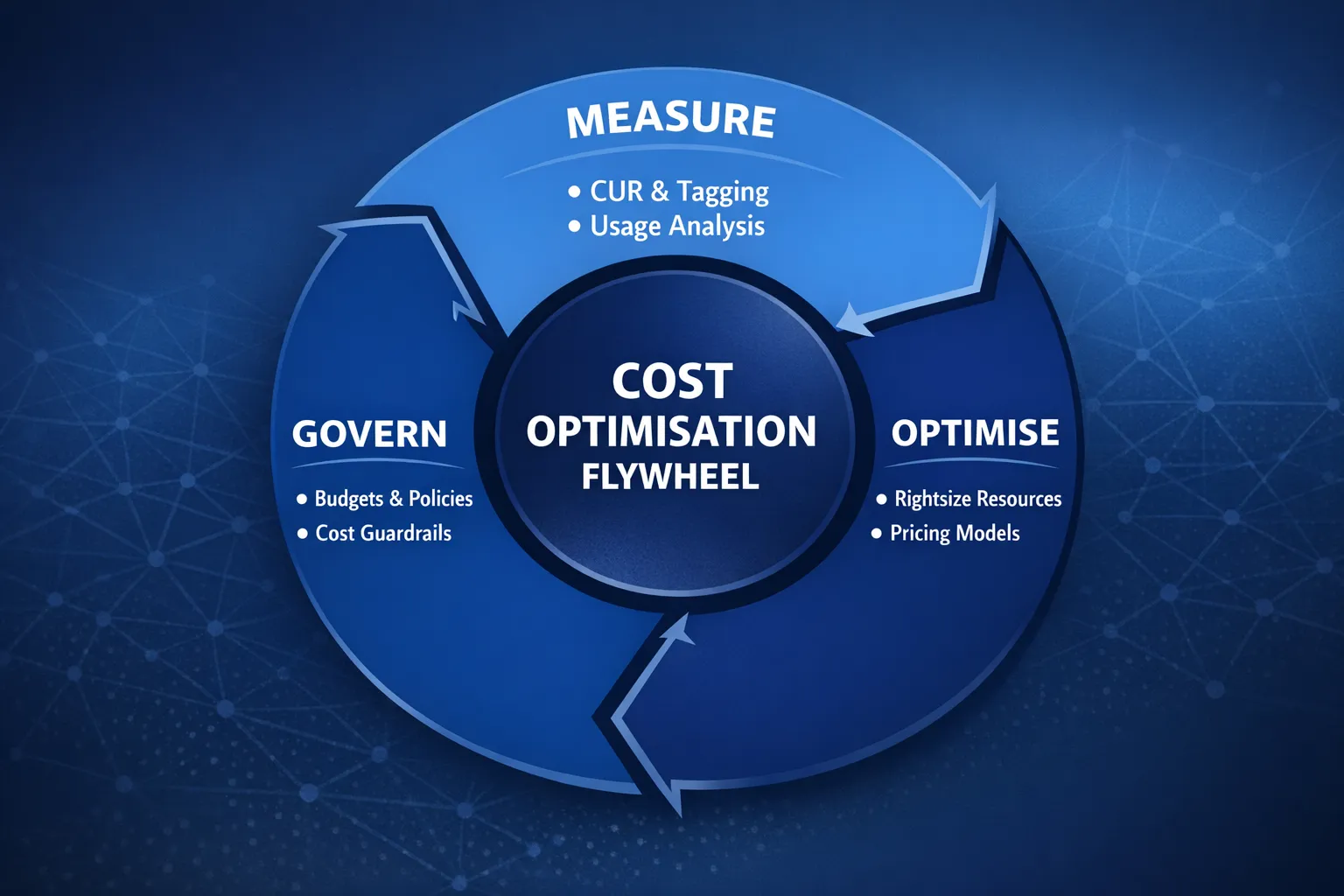
Use a repeatable loop that aligns engineering, finance, and product teams.
- Measure, establish visibility and unit economics. Enable the Cost and Usage Report, tag resources, and agree business metrics like cost per customer or per request.
- Optimise, remove waste and rightsize. Tackle idle, over-provisioned, or misconfigured resources, then adopt the right pricing models.
- Govern, prevent regression. Create budgets, alerts, policies, and a monthly FinOps cadence so savings persist while the platform evolves.
This mirrors the AWS Well-Architected Cost Optimisation pillar, which emphasises measuring, selecting the right resources, and continuous improvement. See the official guidance in the AWS Well-Architected Cost Optimisation pillar.
Step 1, get reliable cost visibility
- Enable the AWS Cost and Usage Report to S3, query with Athena. It is the most detailed, auditable source of truth for spend and usage. Start here, the CUR documentation.
- Standardise cost allocation tags, for example environment, application, team, owner, cost-centre, compliance. Activate them in Billing so they appear in Cost Explorer and the CUR.
- Create AWS Budgets and Cost Anomaly Detection for accounts and major services. Budgets keep stakeholders honest, anomalies surface surprises early.
- Turn on AWS Compute Optimizer recommendations for EC2, Auto Scaling, EBS, and Lambda. It uses actual utilisation to recommend right-sizing, more at AWS Compute Optimizer.
Once you can answer “what drove cost change last week” with data, you are ready to cut waste safely.
Step 2, quick wins you can deliver in 30 days
The fastest savings usually come from removing waste and correcting defaults. Prioritise high-variance areas like dev and test accounts, bursty analytics, and low-utilisation compute.
| Lever | Where it applies | Why it saves | Typical effort | Notes |
|---|---|---|---|---|
| Off hours scheduling | EC2, RDS, EKS node groups, ElastiCache in dev and test | Stop paying 168 hours for resources only needed 50 to 60 hours | Low | Use EventBridge and SSM Automation or Instance Scheduler on AWS |
| Right-size instances | EC2, RDS, ElastiCache | Match vCPU, memory, and storage to observed utilisation | Low to medium | Use Compute Optimizer and performance tests before resizing |
| Move EC2 to Graviton | EC2, EKS nodes, Lambda | Better price performance on ARM for many workloads | Medium | Validate language runtimes and libraries first |
| Buy Savings Plans | EC2, Fargate, Lambda usage | Lower rate for committed baseline usage | Low | Savings Plans can save up to 72 percent versus On-Demand, see Savings Plans |
| Switch EBS to gp3 | General purpose block storage | gp3 decouples IOPS and throughput from size, cheaper than gp2 at like-for-like performance | Low | Consider provisioned IOPS only where needed |
| Set CloudWatch Logs retention | CloudWatch Logs | Log growth is silent spend, retention trims long tail storage | Low | Align retention to compliance and operational needs |
| S3 lifecycle and Intelligent-Tiering | S3 | Move cold data to cheaper classes automatically | Low | Intelligent-Tiering charges a small monitoring fee, still ideal for unknown access patterns |
| Reduce NAT Gateway traffic | VPC | NAT data processing and cross-AZ traffic adds up | Medium | Use S3 and DynamoDB Gateway Endpoints, consider PrivateLink for private services |
| Clean up idle assets | EIP, unattached EBS, old snapshots, idle load balancers | Eliminate orphaned resources | Low | Automate with periodic checks in each account |
Most teams recoup a double-digit percentage of monthly spend from this step alone, especially if it is the first concerted optimisation pass.
Step 3, make structural changes for durable savings
Once the obvious waste is gone, focus on architecture and pricing models that lock in sustainable improvements.
Commit to the right pricing model
- Savings Plans, commit to a 1 or 3 year baseline for steady compute usage. Start small, cover 50 to 70 percent of your predictable usage, then top up monthly as confidence grows. Savings Plans apply to EC2, Fargate, and Lambda. See AWS Savings Plans.
- Reserved Instances, still useful for specific cases like RDS, ElastiCache, Redshift, OpenSearch. Use Standard for maximum discount where you are confident, use Convertible where instance flexibility matters.
Optimise containers and compute
- Containers on EKS, consolidate nodes and right-size instance families. Use Cluster Autoscaler or Karpenter to scale nodes based on pending pods. Prefer Spot for stateless workloads with disruption-aware pod budgets. See our Terraform EKS setup notes in, Terraform EKS Module.
- EC2, move to Graviton where supported, prefer latest generation instance families. Turn on Auto Scaling with sensible minimums rather than static fleets.
- Lambda, tune memory for the best time to cost balance, consider SnapStart for Java, adopt ARM64 where libraries allow, use Provisioned Concurrency only for endpoints that need predictable latency.
Optimise data and storage
- RDS and Aurora, right-size instance class and storage, drop unnecessary Multi-AZ in non production, evaluate Aurora Serverless v2 for spiky or periodic workloads, use RDS Reserved Instances for always-on production.
- DynamoDB, choose the right capacity mode, On Demand for spiky unknown traffic, Provisioned with autoscaling for steady patterns, consider the Standard-IA table class for infrequently accessed data to reduce storage costs. See DynamoDB table classes.
- S3, use Intelligent-Tiering for unknown access patterns, lifecycle large datasets to Glacier Instant Retrieval, Glacier Flexible Retrieval, or Deep Archive where access is rare. Use S3 Storage Lens to find buckets with inefficient patterns.
- EBS, prefer gp3, right-size throughput and IOPS, use EBS Snapshot Archive for long-term retention of backups where retrieval is rare.
- EFS, choose the right throughput and storage classes, EFS One Zone and Infrequent Access can significantly cut cost for appropriate workloads.
Reduce data transfer
- Minimise cross-AZ data for chatty services by co-locating tiers where possible. Keep an eye on traffic through NAT Gateways and Load Balancers.
- Use Gateway Endpoints for S3 and DynamoDB to avoid NAT charges. Consider PrivateLink for private service access.
- Terminate TLS and cache at CloudFront for public content to reduce origin egress and improve performance.
We cover performance considerations that complement cost in our guide, Cloud Performance Tuning.
Practical tooling to make optimisation stick
- Cost and Usage Report with Athena, build simple SQL to reveal the top 10 cost drivers. Example to list services by unblended cost last 7 days:
SELECT
  line_item_product_code AS service,
  SUM(CAST(line_item_unblended_cost AS double)) AS cost
FROM cur_database.cur_table
WHERE bill_billing_period_start_date >= date_add('day', -7, current_date)
GROUP BY 1
ORDER BY 2 DESC
LIMIT 10;- Cost categories and chargeback, create business friendly groupings like Production SaaS, Internal IT, Data Platform. Share a monthly one page roll up with engineering and finance.
- Budgets and anomalies, use cost and usage budgets for all accounts and environments, wire alerts to Slack or Teams. Add Cost Anomaly Detection for quick feedback on misconfigurations.
- Tagging automation, enforce mandatory tags with IaC and admission controls in Kubernetes. Reject untagged resources in CI before they reach AWS.
- Pull request cost checks, use tools like Infracost to show estimated monthly delta for Terraform changes in code review, which drives better decisions earlier.
- Kubernetes cost allocation, adopt pod labels and namespace policies that map to cost categories. Tools like Kubecost can turn cluster usage into unit costs that engineers can own.
For building an observability foundation that also informs cost decisions, review our guide, Observability, Effective Monitoring.
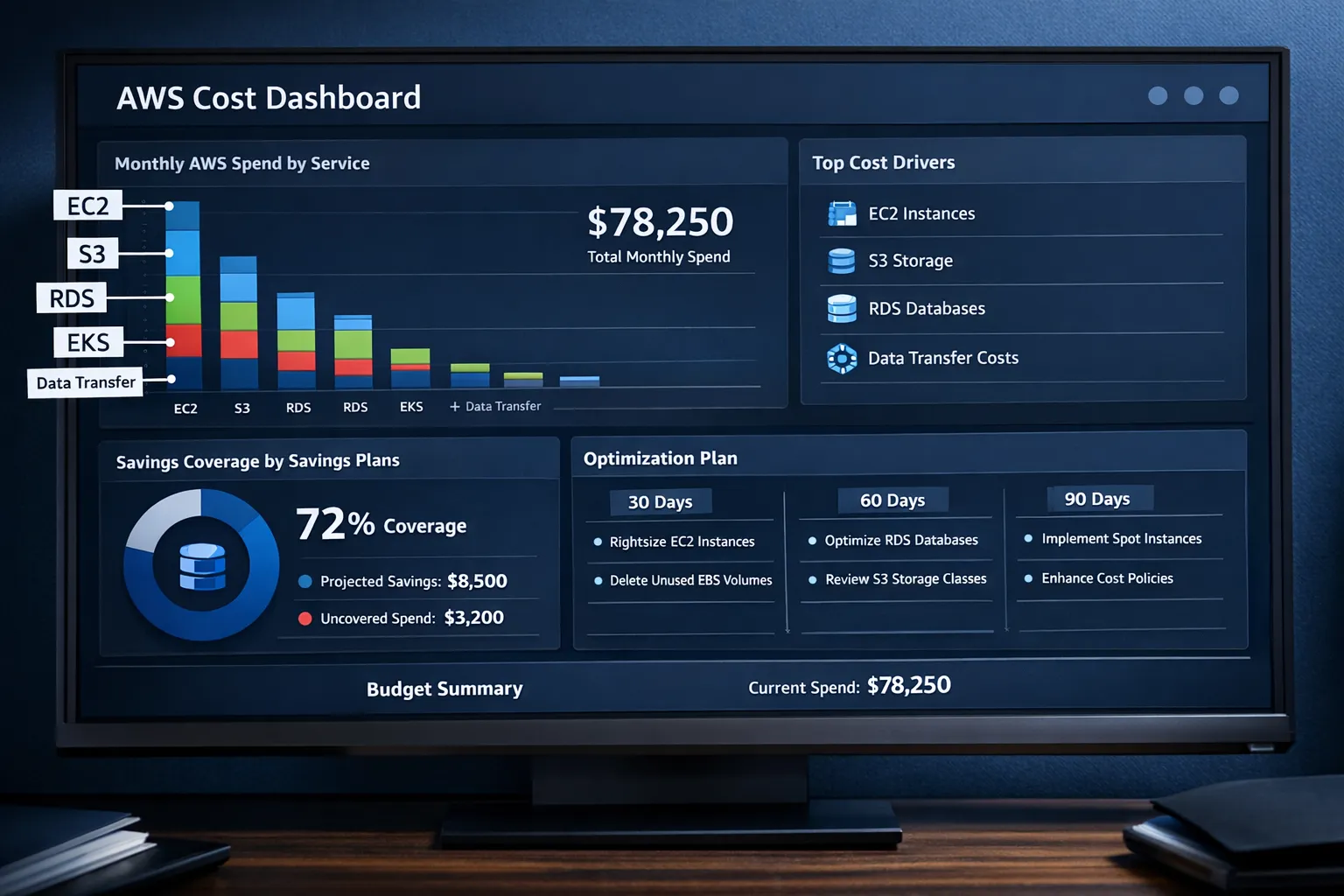
A 90 day roadmap you can copy
Weeks 0 to 2, set the baseline
- Enable CUR, budgets, anomalies, and Compute Optimizer across all accounts.
- Adopt and activate standard cost allocation tags, environment, app, team, owner, cost centre.
- Deliver quick wins, stop idle non production, right-size obvious outliers, clean orphaned resources, set CloudWatch log retention defaults.
Weeks 3 to 6, lock in savings
- Purchase initial Savings Plans for the observed compute baseline.
- Migrate gp2 to gp3, adjust EBS and EFS classes, apply S3 lifecycle policies.
- Move suitable fleets to Graviton, validate performance and compatibility with a canary deployment.
Weeks 7 to 12, optimise architecture and governance
- Introduce Spot where disruption tolerant, containerise or scale down batch workloads.
- Tune data transfer paths with endpoints and CloudFront, reduce cross-AZ chat.
- Establish a monthly FinOps review with product and finance, publish a one page metrics pack with cost per user, per request, and per service.
Service specific playbooks
EC2 and EKS
- Normalise on the latest generation instances, evaluate Graviton for web, API, container, and JVM based services.
- Use Auto Scaling for compute and Horizontal Pod Autoscaling for Kubernetes. Set reasonable minimums in production, scale to zero in dev and ephemeral environments where practical.
- Use Karpenter or Cluster Autoscaler to add and remove nodes based on real pod demand, prefer fewer, larger nodes for denser packing unless bin packing shows fragmentation.
- Separate Spot and On Demand node groups, use Pod Disruption Budgets and graceful termination to handle interruptions.
Serverless
- Lambda, tune memory for optimal cost and latency, adopt ARM64, reduce cold start impact with SnapStart for Java if applicable. Use Provisioned Concurrency on critical endpoints only.
- Event driven architectures often reduce idle compute, but watch out for surges in invocation or downstream data transfer that can shift costs.
Datastores
- RDS, right-size instance and storage, avoid over provisioned IOPS, use Performance Insights to find slow SQL rather than up-sizing by default.
- Aurora, consider Serverless v2 for elastic, spiky workloads, use reader endpoints and caching to control write pressure.
- DynamoDB, pick capacity mode per table, enforce TTL for ephemeral items, consider Standard-IA table class for archival entities.
Storage and logs
- S3, implement lifecycle at creation time, version only where needed, expire incomplete multipart uploads.
- CloudWatch Logs, set a default retention for each log group on creation, export long term logs to S3 and query with Athena to save ongoing ingestion and storage cost.
Networking
- Prefer Gateway Endpoints for S3 and DynamoDB over NAT for private subnets. Where NAT is required, reduce cross-AZ routing where safe.
- Use CloudFront to cache public content and reduce origin egress. Review Load Balancer types and consolidate where possible.
Unit economics that align engineering with finance
Translate infrastructure cost into product metrics so teams can make better trade offs.
- Cost per request or session for your primary customer journey.
- Cost per active user, daily or monthly, include data transfer and third party SaaS.
- Cost per environment for dev, stage, prod, which highlights non production sprawl.
- Cost per microservice or team, anchored by tags and cost categories.
The FinOps Foundation has a good primer on collaboration and unit economics, see What is FinOps.
Governance that prevents regression
- Policies as code, enforce guardrails with AWS Organizations, SCPs, and IaC. For example, deny creation of gp2 volumes or enforce log retention.
- Budget ownership, each team owns a budget with alerts at 50, 80, and 100 percent. Monthly review with a simple narrative on variance and actions.
- Golden paths, provide Terraform modules and internal templates that embed best practices, correct instance families, tagging, logging, and lifecycle rules.
Frequently Asked Questions
How do Savings Plans compare to Reserved Instances? Savings Plans apply automatically to eligible compute usage like EC2, Fargate, and Lambda and offer flexibility to change instance families and regions within the commitment. Reserved Instances are service specific, for example RDS, ElastiCache, or EC2, and can offer similar or higher discounts for a fixed configuration. Many teams use both, Savings Plans for compute baselines and RIs for specific databases.
Is moving to Graviton risky for production workloads? Most modern languages and frameworks run well on ARM. Common libraries have ARM builds, and containers simplify dual architecture images. Plan a phased migration, start with non critical services, run side by side canaries, and validate performance and latency under load before moving the rest.
How do we control costs in Kubernetes? Treat namespaces as cost boundaries, require labels that map to cost categories, and enable autoscaling for both pods and nodes. Use cluster cost tools to show per workload spend and feed that into team budgets. Avoid over provisioning requests, which leads to underutilised nodes.
What is the fastest way to trim an inflated AWS bill? Start with waste removal, stop idle dev and test resources out of hours, right-size the largest EC2 and RDS instances, move gp2 to gp3, set CloudWatch Logs retention, and release orphaned EBS and EIPs. Then purchase Savings Plans for the stable baseline.
How should we structure accounts and tags for cost clarity? Create separate AWS accounts per environment and major platform area using AWS Organizations, and enforce a small set of mandatory tags, environment, application, owner, cost centre. Activate the tags in Billing so they appear in Cost Explorer and the CUR.
Work with Tasrie IT Services
Tasrie IT Services helps engineering teams ship faster, improve reliability, and reduce costs. If you want a hands on AWS cost optimisation programme, from quick wins to a sustainable FinOps cadence, we can help with assessments, Savings Plans coverage strategy, Kubernetes rightsizing, IaC guardrails, and observability that ties cost to performance.
- Review related posts, Cloud Performance Tuning, Observability, Effective Monitoring, and Terraform EKS Module.
- Ready to reduce your AWS bill with measurable outcomes, visit Tasrie IT Services to start the conversation.